Startup Sequence¶
Section summary Startup is tuned to reach an operable state in about 1.3 seconds. All heavy work is pushed to asynchronous + deferred execution (Background-priority
Dispatcher.BeginInvokeor the thread-poolStartupInitTask), leaving the UI thread to focus only on XAML parsing and settings application.
On first launch, a welcome window is displayed, guiding you through a feature introduction, theme selection, and EULA acceptance before transitioning to the main window.
On subsequent launches, the main window appears directly, and a brief welcome animation (approximately 3.5 seconds) plays in the status bar (this can be turned off in the effects settings for instant display).
Services (system tray, auto-update, etc.) are lazily initialized after rendering is complete, ensuring a smooth initial display.
- Epithet Welcome Greeting: On startup, the epithet earned through challenges is displayed as a welcome message in the status bar.
Phase Breakdown and Measurements (baseline since v0.40.31)¶
| Phase | Typical duration | Thread | Main work |
|---|---|---|---|
| OnStartup | ~150ms | UI | Mutex, FileLogger, AppResources.xaml (LoadHeavyResources), theme apply, KeyBindings, L10n |
| MainWindow ctor | ~730ms (~880ms cumulative from launch) | UI | InitializeComponent (XAML parse), NavViews initialization, ApplySettings (theme + AI settings load) |
| Window_Loaded → InitializeAsync | ~435ms | UI + async | Await StartupInitTask, restore pane tabs, load favorites |
| Total to operable state | ~1,300ms | — | — |
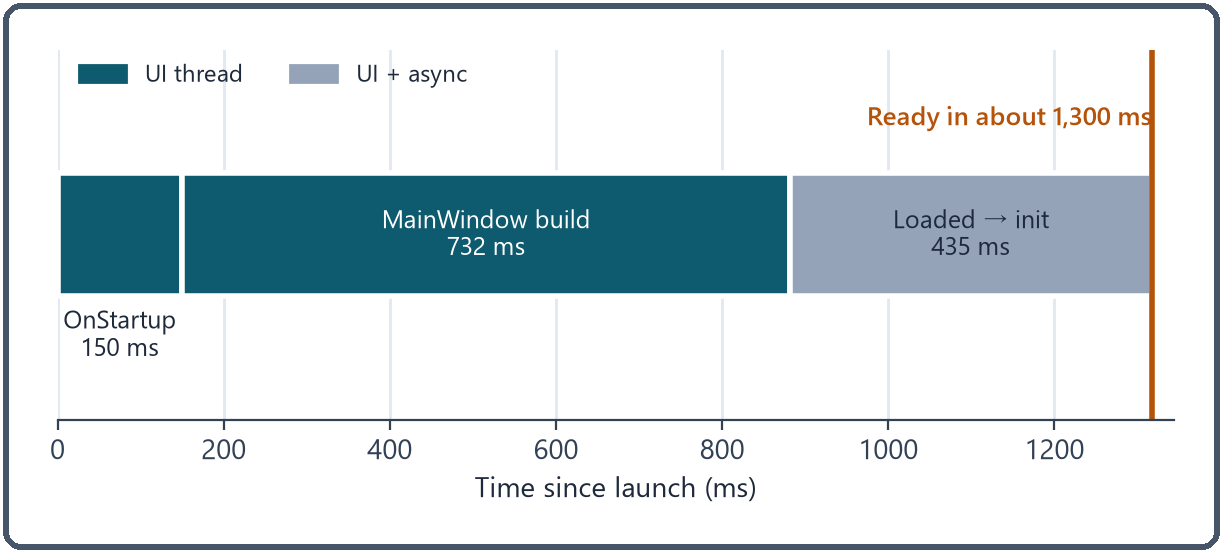
Measurement points are emitted with the [STARTUP-TIMING] / [CTOR-TIMING] / [APPLY-TIMING] / [LOADED-TIMING] log prefixes (in data/logs/*.log).
Async chain and deferred service initialization¶
At startup, the app runs the following steps in order.
- OnStartup (UI): Only minimal synchronous work (FileLogger, settings-load await, theme apply, L10n, resource dictionary).
- MainWindow display:
InitializeComponent+ApplySettings+ nav pane initialization on the UI thread. Application.Current.Dispatcher.BeginInvoke(..., DispatcherPriority.Background): After rendering completes,CpuIdleService/TrayIconService/UpdateServiceare initialized on the low-priority queue.StartupInitTask = Task.Run(...)(background thread):PathHelper.EnsureSpecialFoldersCached→Database.InitializeAsync→License.InitializeAsync+TabActivity.InitializeAsyncrun serially / in parallel.Window_LoadedawaitsStartupInitTaskto join.--updatedargument detection: When launched with this argument, an "Update completed (vX.Y.Z)" toast is shown andUpdateService.CleanupTempFiles()runs.
Forbidden patterns on the startup path (per CLAUDE.md)¶
- Do not touch
App.AiServicefrom the UI thread.Lazy<AiService>lock contention has frozen startup in the past (feedback_lazy_aiservice_no_ui_thread). Force first access viaTask.Runwhen needed. - Do not add synchronous I/O inside OnStartup (
File.ReadAllText,Directory.CreateDirectory, heavy disk access, etc.). Push any such work toStartupInitTask. - Do not run heavy synchronous work inside
Dispatcher.BeginInvoke(Background). Background priority effectively blocks the UI thread. - Do not first-access new
Lazy<T>services on the startup path. The initialization cost lands on the UI thread. - Do not delete
bin/(it contains execution data). Clear onlyobj/when cache clearing is needed.
Changes to startup-related code must go through the dedicated guard-startup agent (CLAUDE.md § 8. Startup Processing Changes).
Known startup behavior¶
- DWM freeze with PaneCount=1 + off-screen window: After certain Windows Updates,
ContentRenderedfails to fire in this combination. The app temporarily draws withPaneCount=2at startup and switches to the saved value afterContentRenderedfires (project_panecount1_dwm_freeze).