Confirmation & Error Dialogs
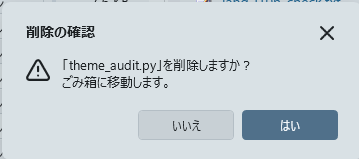
Confirmation dialogs and error messages within the app are displayed using custom app dialogs rather than standard Windows MessageBoxes.
They feature a modern design with a sepia background (#F5F1E3), rounded corners (8px), and drop shadow, unified with the overall app appearance.
Icons (info, warning, error, confirm) and buttons (OK / OK-Cancel / Yes-No) automatically switch based on the dialog's purpose. You can press Esc to cancel and drag the title bar area to move the dialog.
-
Error feedback: When an unexpected error occurs, the error dialog displays a "Send Feedback" button.
Error details (stack trace, etc.) are automatically attached, allowing you to report directly to the developers.